


RAID (Redundant Array of Independent Disks) is built with multiple hard drives combined in a single array. There are different RAID hard drives available, ranging from RAID 0 to RAID 10. The RAID levels are based on three data storage techniques, including Striping, Mirroring, and Parity. These storage drives are primarily developed to provide four major goals reliability, performance, capacity, and fault tolerance or redundancy.
Despite their namesake redundancy capabilities, RAID drives may fail like other hard drives. The reasons for RAID failure could be anything, including RAID partition loss, data corruption, frequent read/write errors, RAID server crash, controller malfunction, multiple disk failure, power surge, malware infection, and fire and water damage. Due to all these reasons, RAID drives may become inaccessible to you, and so its data. Thus, there comes the role of RAID recovery.
What is RAID Recovery?
RAID recovery refers to recovering files, folders, and other data from RAID hard drives. The recovery process includes both automated and manual file recovery procedures for retrieving data from one or more RAID drives and storage components. This process supports data recovery from hardware and software-based RAID.
How does RAID recovery work?
RAID drives use different and complex mechanisms to store and recover data than other hard drives. Recovering files from the RAID drive requires reconstruction of the entire RAID array to its good old configuration. And to do so, identifying the correct RAID array is crucial. Reconstructing or rebuilding RAID needs powerful and reliable software that should know the RAID configurations at firmware, hardware, and software levels to enable successful data recovery.
Best Solution for RAID Recovery
The market is flooded with multiple RAID recovery software. However, choosing a reliable and powerful solution that can virtually rebuild RAID and recover data efficiently is necessary, such as Stellar Data Recovery Technician. It is an easy-to-use DIY software that can simultaneously restore all kinds of data such as files, folders, documents, photos, videos, audio files, and more. This RAID Data Recovery Tool supports recovery from formatted, corrupted, or even missing RAID logical volumes.
The software intellectually detects the RAID parameters and rebuilds RAID virtually to restore lost, missing, and inaccessible RAID and Windows drives. Be it a hardware or software-based RAID drive, you can create an image of the entire RAID array for a secure and quick drive recovery in case of severely corrupted RAID drives. It supports recovery from different RAID levels, including RAID 0, 5, & 6.
How to perform RAID Data Recovery?
You can easily recover data from RAID, using Stellar Data Recovery Technician software. Follow the given steps:
- Download, install and launch Stellar Data Recovery Technician on your system.
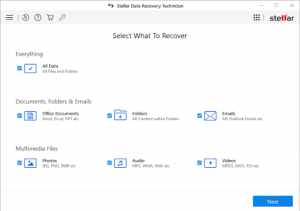
- On ‘Select What to Recover’ screen, choose ‘Everything’ or the type of data you want to restore and click Next.

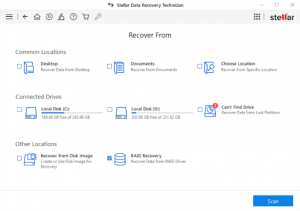
- Next, select RAID Recovery on the ‘Recover from’ screen.
- Now, choose RAID level (RAID 0, 5, or 6), whichever you’re using.
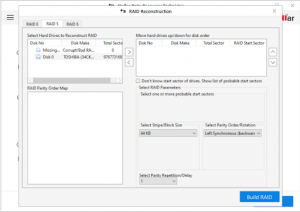
- On the next prompt, move the RAID disks from ‘Select Hard Drives to Reconstruct RAID’ to ‘Move hard drives up/down for disk order’ list box using the arrow buttons.
- After that, arrange RAID drives in the same sequence as they were originally in the RAID array.
- Select all the parameters available and click Build RAID.
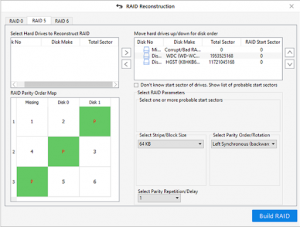
- The software then starts identifying and constructing virtual read-only RAID configuration based on available RAID parameters.
- Click ‘Show Volume List’ after selecting virtual RAID construction.
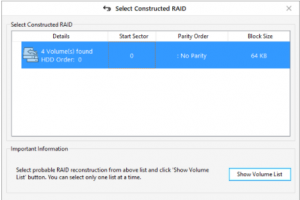
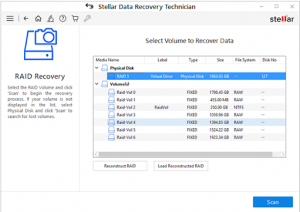
- Choose RAID virtual drive and click Scan under ‘Physical Disk.’
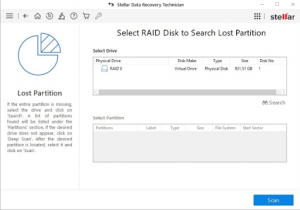
- Choose RAID drive and click Search.
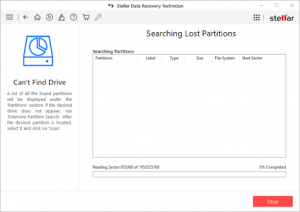
- Now, choose the RAID partition and click Scan.
- Now, choose all the files you want to restore and click on ‘Recover’.
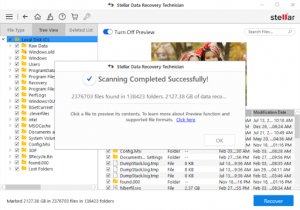
- Connect a different external drive to the PC. Now, click ‘Browse’ to choose this external storage media as the desired location to store location.
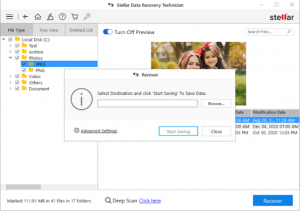
- Finally, click ‘Start Saving’ to save the recovered files.
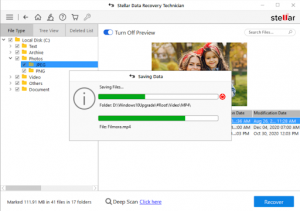
Note: If you want to recover from a severely corrupted RAID array, you can use ‘Recover from Disk image’ on the ‘Recover from’ screen. It will help you perform quick and secure data recovery from RAID drives.
To Conclude:
Though RAID is popular for great performance and redundancy, it may fail like any other hard drive. The reasons behind RAID failure could be multiple, as discussed in this post. Fret not! RAID Recovery is possible.
It is a little tricky process and thus requires a specialized tool. However, using powerful DIY software such as Stellar Data Recovery Technician, you can easily recover data from RAID drives and avoid further damage to your data. Additionally, we’d recommend you start backing up your RAID drive data to prevent data loss in the future.