


Your growth strategy on social media is only valid if it’s measured correctly. Though your video content lands on the For You Page(FYP), resulting in high engagement, it isn’t the only way to check if your content is performing well on the platform.
The analytics tool on TikTok is an in-built feature that makes you analyze followers, video views, and other crucial factors that impact your profile’s strength. Here, we can see everything about TikTok analytics. Let’s move in.
How To Analyze Your TikTok Analytics
If you set your profile well, then it’s easy to analyze your TikTok analytics. To access this feature, you must have a pro account on TikTok. It’s free and lets you set up a creator or business profile.
How To Access Analytics On TikTok For Your Profile
To do so, you must convert your normal profile to a pro account on TikTok. Here is how:
- Launch the TikTok app
- Click the “Me” option at the screen’s bottom right.
- Click the three dots at the screen’s top right.
- Click the “Switch to Pro Account” from the manage account option
- Choose business or creator, and both options will have analytics access.
- Give the required data for the account type you choose.
- Click Done.
Why Can’t I View My TikTok Analytics?
If your profile is still personal, you can’t see your TikTok analytics feature. Utilize the points mentioned above to convert to a business or creator account.
How To Monitor Video Stats On TikTok
You can also monitor TikTok analytics for every video that you publish on the platform, in addition to the TikTok analytics for your entire content and profile. Here’s how you can do it:
- Launch the TikTok app
- Click the “Me” option at the screen’s bottom right.
- Click on the video that you need to monitor.
- Click the three dots at the screen’s top right.
- Click the analytics option at the screen’s bottom-left.
You’ll be able to see information like the video’s average viewing time, the number of times it was streamed, and the source of the video’s traffic from there.
Here’s how to discover your complete profile’s analytics:
- Launch the TikTok app
- Click the “Me” option at the screen’s bottom right.
- Click the three dots at the screen’s top right.
- Click Creator tools and then Analytics from the drop-down menu.
If your TikTok videos get massive engagement with real TikTok likes, then it strengthens your analytics feature. It has a high chance of acquiring your content on the For You page. Create unique and user-needed content to grab high reach.
What is covered by the TikTok Analytics tool?
Now that you have clarified where to check your analytics on TikTok let’s go through the particular data covered by TikTok analytics and how to utilize it to increase your profile.
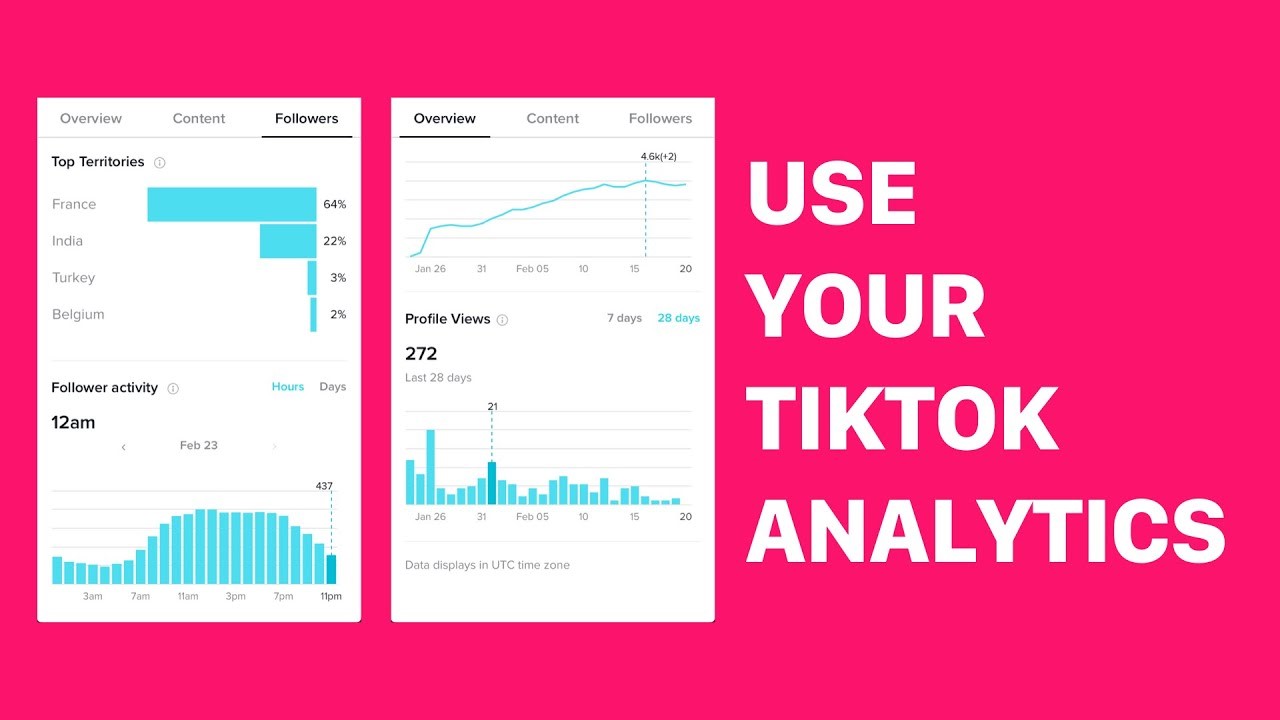
The Tab “Overview”
The Overview tab is the first tab you will see when you launch the TikTok app first. It showcases the data mentioned below for the seven days:
- Your total views count on every content uploaded in the last week, and also, the number has decreased or increased from the previous week.
- Your total followers count.
- The followers you have lost or gained.
- The entire profile views count, and also the number has decreased or increased from the previous week.
You may analyze data from the last 28 or 60 days by changing the date at the top of the page. You may also provide a custom date range.
These figures help determine whether your profile or content saw a significant increase in traffic during the week. You may then utilize that data to figure out which video brought in the most traffic and generate relevant ones in the future.
The Tab “Content”
You could get the information relevant to your posts on the platform in the past seven days if you tap the content tab(at the top of the screen). The following information will be included:
- The entire video count you have uploaded.
- The trending videos count at present.
- Particular analytics for every video content(newest to oldest)
The tab also contains a Create Post option which directs you to the camera to record on TikTok.
The Tab “Followers”
The last option with analytics is the Followers tab, which is placed in the top-right corner of the screen. It contains information on your followers, such as:
- The current amount of followers you have
- A graph indicates whether the overall number has risen or fallen in the last week.
- Gender and geography of your followers.
- What videos have your followers viewed?
- What tracks have your fans listened to?
- The only drawback to this option is that you must have at least 100 fans before seeing any demographics.
Video Analytics
It is the detailed statistics on individual videos. You may find them on your profile or by going to the Content page and clicking on the video. These analytics contain information like:
- How many times has your video been viewed?
- The total amount of likes the video has received
- The total number of comments the video has received
- How many times has it been circulated?
- Its entire playtime
- The average watch time
- Video traffic sources, such as the FYP(For You page) or your profile
- The number of people who viewed your video and where they came from
Using TikTok statistics to determine which videos are the most popular can help you develop the content type your audience wants to watch. So, whether you’re providing TikTok photography tips or humorous drawings from your daily life, you can reach the right audience with your videos.